Most of the projects on this site run on the same small box: a Mac mini in the utility room. It draws little power, it's quiet, and it is fast enough for local AI models and video detection. This page shows how it is set up. Addresses and names are left out on purpose.
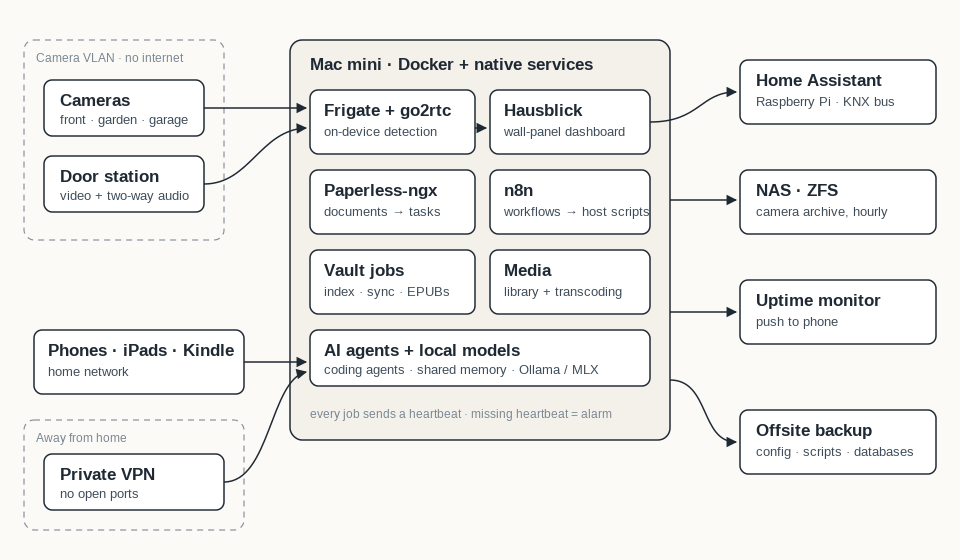
What runs on it
About 28 containers and a handful of native services, grouped by job:
| Area | What | Why |
|---|---|---|
| House | Hausblick dashboard | wall panels and phones |
| Cameras | Frigate + go2rtc | detection and recording, all local |
| Paperwork | Paperless-ngx | scanned documents, deadlines turned into tasks |
| Automation | n8n | about a dozen workflows that trigger scripts on the host |
| Notes | LifeVault jobs, Kindle pipeline | indexing, syncing, building EPUBs |
| Media | media server and transcoding | the family library |
| Monitoring | Uptime Kuma, push notifications | see below |
Home Assistant itself runs on a separate Raspberry Pi, so that the house still works when I'm tinkering with the Mac.
Cameras without a cloud
- The cameras sit in their own VLAN without internet access.
- Frigate records them and detects people.
- Detection runs on the Mac's Neural Engine via a native detector, not on the CPU inside Docker. Two-way audio works through go2rtc.
- Recent footage stays on a fast SSD. Every hour, a job moves older footage to a ZFS pool on a small NAS, and the retention rules clean up after themselves.
- Nothing leaves the house. Remote access goes through a private Tailscale network, never through an open port.
Silence is an alarm
The most useful rule in the whole setup:
A job that never starts never fails.
So every scheduled job reports in: a heartbeat to an uptime monitor at the end of each run. If a heartbeat doesn't arrive, my phone gets a push notification. The same goes for disk space below 10 GB, a container that keeps restarting, or a failed n8n workflow.
The second rule: exit code 0 proves nothing. Every job checks its own result. Did the backup actually write files? Did the sync actually move anything?
Backups
- Everything important (configuration, scripts, databases, the agent setups) is backed up with Arq.
- Video and bulk media go to the NAS instead.
- Runtime data that changes constantly is kept out of the synced folders on purpose. In one case that saved about 5 GB of sync traffic per day.
AI on the same box
The Mac also runs the coding agents that built most of this: Claude Code, Codex and a shared memory service. They reach it over SSH from any device. It's also where local models (Ollama, MLX) run. The plan is to move routine work there over time.
What I'd do differently
- One repo per concern, from day one. The camera setup, the dashboard and the KNX tooling started as separate repos. Merging them later is more work than keeping them in one structured monorepo from the start.
- Write the restore guide before you need it. "Rebuild after replacing the Mac" is now a checklist in each repo.
No IPs, hostnames or domains are shown here on purpose. If you build something similar, keep yours out of screenshots too.